
You’re never too old (or stupid) to learn something new about your camera, and I certainly found out about something the XT-5 can do yesterday.
I have in the past experimented with different image ratios set on my Fuji cameras. However, as JPGs are always produced alongside the RAW when you use this facility, and I only use RAW, I always felt ambivalent about the “untidiness” of the operation, so I carried on with 3:2 and cropping when required from within Lightroom.
However, over the last five years or so, I have been shooting 90% of my images in 5:4 with the rest as 1:1, and a few 16:9, all cropped in post-processing. I like the viewer focus that 5:4 places within the frame, which I think makes my images stronger. Then, yesterday, I read an article discussing using the 5:4 ratio in the XT-5 as the set format. Whaaaat? I didn’t know the X-T5 had this added ratio facility, my X-T4 (and venerable XPro-2) certainly dont. So I looked, and sure enough, there it was.
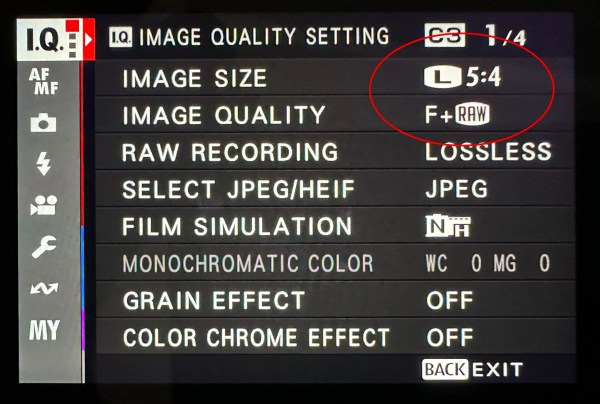
Setting the X-T5 up for this was easy. In the “IQ” menu, I changed the “Image Quality” from “RAW” to “Fine (F) + RAW” and the “Image Size” from “RAW” to “L 5:4”.
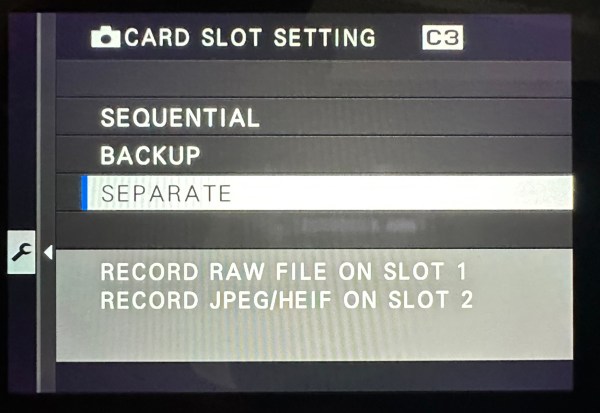
But what to do about the JPGs that are produced and which are superfluous for me? Well, after thinking about it, that was easy. I set the “Data Setup” as card 1 for the RAW files and card 2 for the Jpgs.
When I download my images to Lightroom, I do so from card 1 and then format both cards afterwards without using the Jpgs on card 2. The really good thing about being able to set this ratio up in the camera is that the RAW files actually appear as a 5:4 ratio in Lightroom’s Library module, but when you open the Develop module and click on Crop Overlay, you can see the full 3:2 file and if neccessary can be used as such. Of course, in the EVF and the screen, the viewing boundary is set to 5:4, so composition for that particular ratio is easier.
My X-T4 does not have this 5:4 facility (come on Fuji, let’s have a bit of Kaizen here), whereas my X100VI does, but only has 1 memory card, so I would have the hassle of getting rid of the Jpgs on import. However, as I intend to give Fuji Jpgs a go in my street photography with X100VI, I may also give 5:4 a try. The only downside is that the 5:4 ratio is baked into the Jpgs and cannot revert to 3:2, and sometimes I need that extra room to straighten a shot without losing anything of importance in the image.
The knowledge that I can do this with 5:4 on my X-T5 has also led me to add other ratios I use into the camera’s Q menu. I have added 16:9 for landscapes, and 1:1 for still lifes and abstracts. This is pursuant to a more contemplative style of photography I wish to adopt, one where I actively think about the format and ratio of an image before it’s taken, not cropping in post-processing.
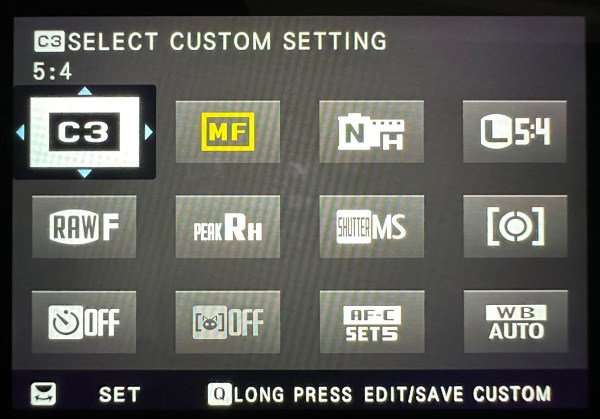
Unfortunately, I can’t do this technique with the X-T4 (you couldn’t do it with the X-T3, 2 and 1 either). The Q menu does not work in the same way as later cameras. Changing a Q setting in the X-T4 will alter the same item in all of the other banks (C1, C2, C3, etc.), which obviously is not helpful. In other words, you can’t really save different setups on the older cameras in the same way as on the X-T5 and X100VI.
I can’t wait to get out there and give this a try once the awful weather we are having in the UK at the moment lets up.

 A Sensored-View